
Summary: The best walk-in clinic workflow systems for patient check-in prioritize efficient queue management and seamless integration with scheduling and EHR systems. CERTIFY Health excels in connecting arrival, queue, and scheduling, while OmniMD focuses on front-desk-light document capture. Clearwave offers significant reductions in wait times and staff workloads. ScanQueue allows phone check-in and car waiting, CharmHealth integrates check-in with urgent care EHR, and PracticeEHR uses AI for fast insurance capture.
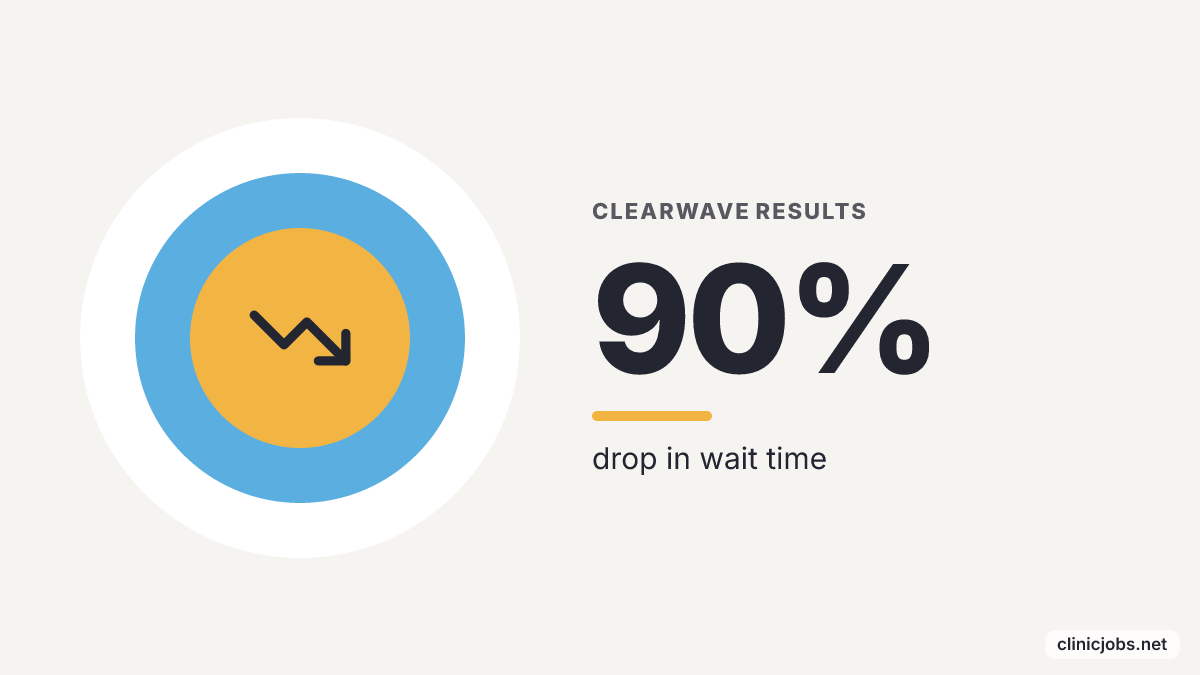
Clearwave says its patient check-in kiosks cut wait times by 90% and staff workloads by 87%, which shows how much waste can pile up at the walk-in front desk before a clinician ever sees the patient.
A walk-in clinic check-in system is more than a digital clipboard. The right workflow links arrival, scheduling status, forms, insurance capture, triage visibility, and queue movement so the lobby does not turn into the hidden bottleneck between demand and care. When those pieces sit together, patients move through faster, and the front desk spends less time untangling missing information.
For most walk-in clinics, the better buy is queue control first and feature count second. A system that lets front-desk staff and clinicians see arrival status changes the workday more than a kiosk that only swaps out paper forms, and that difference matters when licensed staff are deciding whether a clinic looks organized enough to join. The clinic stays steadier during busy periods, and staff spend less time chasing the next step.
1. CERTIFY Health: best for connecting arrival, queue and scheduling
CERTIFY Health Walk-In Check-In Management is an integrated workflow tool with a self-service kiosk for patient check-in. It connects patient arrival, queue management, and EHR scheduling in one system. The product fits walk-in clinics that want check-in inside the same operating flow as scheduling rather than off to the side as a lobby device.
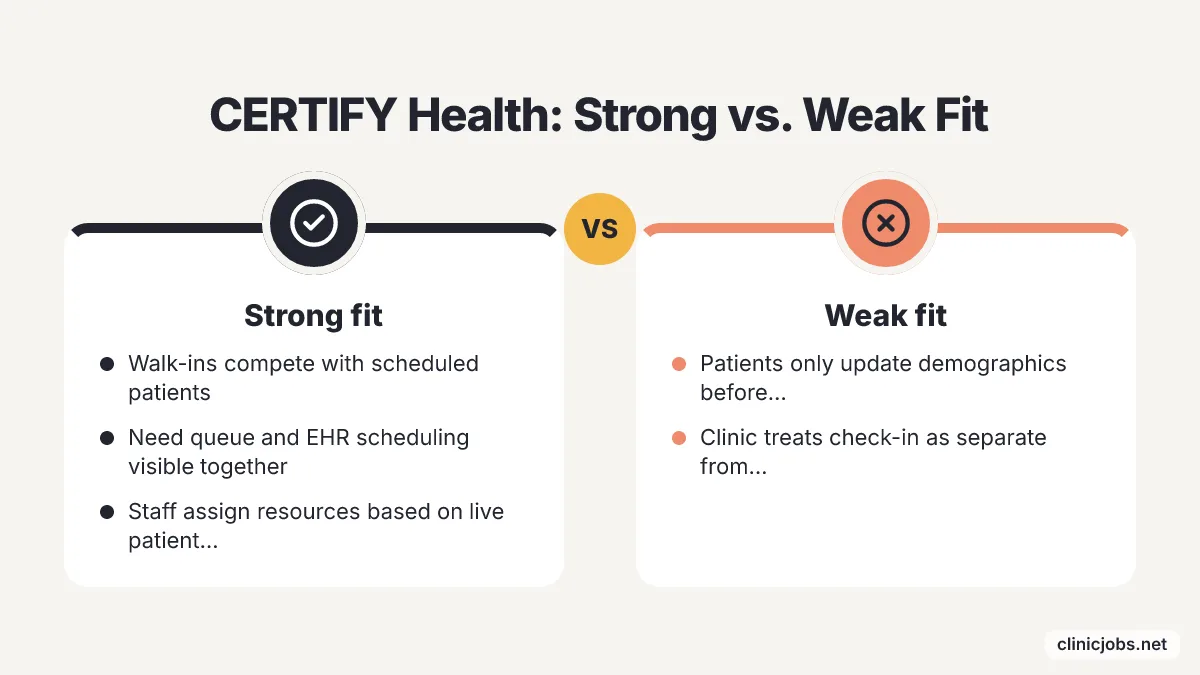
CERTIFY Health works best when a clinic treats walk-in demand as a scheduling problem and a lobby problem at the same time. A mature walk-in workflow does join scheduling and patient check-in: the patient arrives without a fixed appointment slot, but staff still need the EHR schedule, the queue, and the clinical team to agree on who is waiting and what happens next. That setup gives staff a clearer read on patient flow, and it helps them assign resources without guessing.
CERTIFY Health is a weaker fit for a clinic that only needs patients to enter demographic updates before a prebooked visit. The buying case gets stronger when walk-ins, scheduled patients, and same-day clinical capacity all compete for the same staff attention. In those settings, keeping patient flow visible matters because delays and handoffs show up quickly at the front desk.
2. OmniMD: best for front-desk-light document capture
OmniMD Patient Kiosk lets patients check themselves in, verify insurance, update records, and sign consent forms without front-office intervention. The product fits clinics where the check-in pain comes from repeated administrative tasks rather than triage complexity.
OmniMD is a practical fit for walk-in clinics that still depend on staff to ask the same intake questions at every arrival. Insurance verification, record updates, and consent capture belong early in the visit because missing information gets harder to fix after the patient reaches the exam room. Automating those tasks cuts the administrative load on staff, so they can spend more time on patient needs that take actual judgment.
OmniMD's position is narrower than a full queue-management system. A clinic that needs a calm lobby dashboard for clinicians or a car-waiting workflow should look for deeper queue controls, while a clinic trying to cut manual form handling gets a clearer match from OmniMD's kiosk model. The system is strongest when the goal is simpler document capture, not a full rebuild of the clinic's workflow.
3. Clearwave: best for measurable wait-time and workload reduction
Clearwave Patient Check-In System handles scheduled patients and walk-ins with very little staff attention. Clearwave reports a significant drop in wait time and a notable reduction in staff workload. For clinics that want numbers tied to a check-in change, that makes it an easy candidate.
The published figures speak to two different audiences. Practice managers track staffing hours and desk overtime. Doctors care about people reaching the exam room already registered, calm, and ready to go. That split pitch fits business needs and clinical reality in the same building, and it cuts down the usual lobby drag.
The catch sits in the clinic's traffic. A slow site with only an occasional same-day arrival needs simple front-desk habits before anyone buys kiosks. A paper process that works, or even a basic clipboard, costs very little when nobody is standing in the hall. Clinics on tight margins, or clinics with small sites, should clear the basic intake snags by hand before paying for kiosk hardware.
4. ScanQueue: best for phone check-in and car waiting
ScanQueue Urgent Care Queue Management lets walk-ins check in on their phone, gives clinicians a triage path, lets patients wait in their car, and gives staff a calm queue dashboard. It fits urgent care clinics where crowded waiting rooms push stress levels up for everyone in sight. ScanQueue works because a personal screen takes the place of the reception clipboard.
Waiting in an air-conditioned car changes the feel of a walk-in visit. Patients avoid sitting shoulder to shoulder with strangers, receptionists stop answering the same questions about wait time every few minutes, and sick visitors spread fewer airborne germs across shared chairs.
The triage tool helps clinical teams sort people right away. A walk-in intake system has to do more than log an arrival time. Nurses and providers need clinical priority, clear status flags, and a plain view of who is ready for a room, who is waiting outside, and who needs a vitals check before anything else happens. That visibility lets providers spot serious complaints quickly. Patients get treated sooner, and fewer people leave angry about the wait.
5. CharmHealth: best for urgent care EHR check-in
CharmHealth Urgent Care EHR includes a check-in kiosk where patients update personal details, insurance information, and medical history, which cuts patient waiting time. It suits clinics that want intake built into chart software instead of adding a separate lobby system.
CharmHealth fits operations where the chart update has to happen the moment someone walks through the door. Walk-in visits often start with no previous record. A kiosk that pulls in insurance details, current medications, and past procedures before the exam door opens gives nurses and doctors clean data to work with. Clinicians make fewer charting mistakes and provide better care because the history reaches the chart before the physical exam starts.
Line management is not the product's only focus. An urgent care practice that wants to tame a chaotic lobby will find dedicated line-management tools easier to add. A site replacing core medical records software will find real value in keeping check-in tied directly into billing, charting, and rooming. That setup stops staff from copying information between different programs, and the team gets through the day faster.
6. PracticeEHR: best for fast insurance capture with AI scanning
PracticeEHR Patient Check-In Kiosk pulls personal details and insurance data in seconds with built-in AI scanning. It fits clinics where the slowest part of walk-in intake is reading cards, typing fields, and fixing insurance mistakes.
PracticeEHR suits a front desk that loses time to card handling and repeated demographic entry. AI scanning has a narrow job here, but it does it well. It moves information from the patient's papers into the intake flow faster, then leaves staff to check exceptions instead of retyping everything. That cuts down on human error and gets the check-in line moving, so staff can turn to the work that actually needs them.
PracticeEHR is not the widest walk-in queue system in this list. Its strongest pull is speed at the intake-capture point, especially when insurance detail quality changes the billing work after the visit. Accurate, timely data capture helps clinics keep finances steadier and patients less annoyed by avoidable mistakes.
How should a walk-in clinic choose a patient check-in workflow?
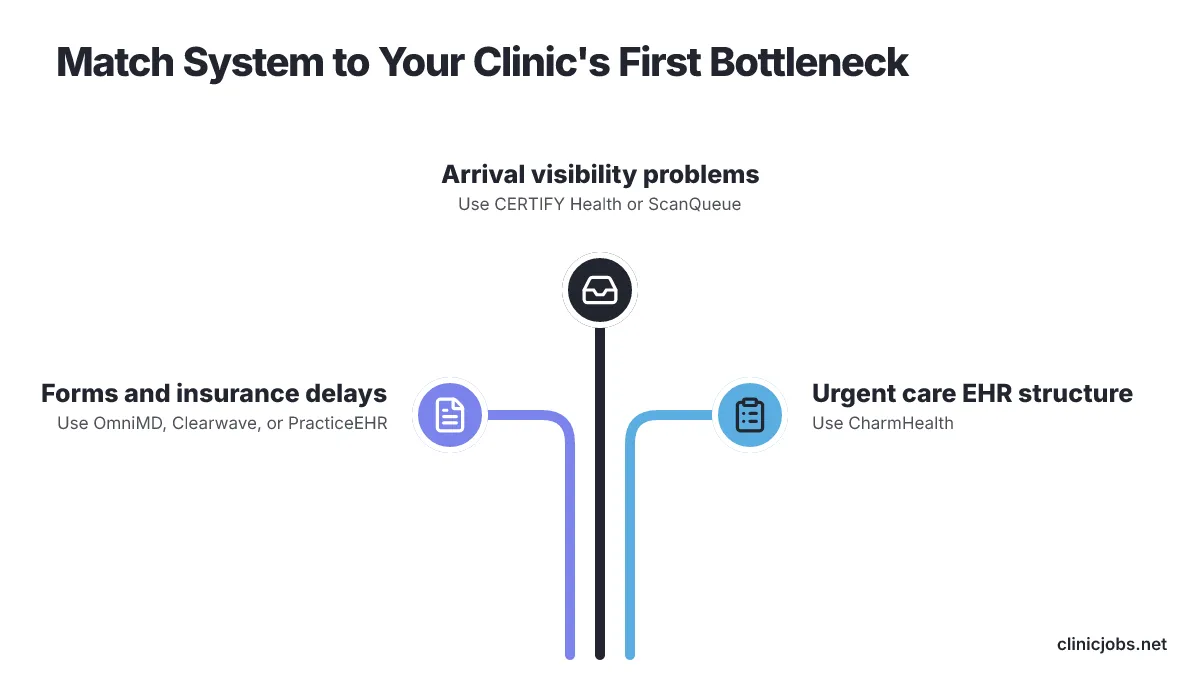
A walk-in clinic should pick the system that fits the first place its visit flow breaks, whether that is arrival visibility, document capture, insurance handling, triage, or queue communication. Buying the heaviest platform on the market is a mistake when the daily failure is narrower and easier to name.
A practical selection process starts with the lobby's real handoffs. Write down what happens from arrival to rooming, including who records the patient, who checks insurance, who sees the queue, who triages, and who tells the patient where to wait. A check-in system should remove one named handoff or make it visible, not just move the delay onto a screen.
A clinic that struggles with unknown walk-ins should prioritize arrival-to-queue systems such as CERTIFY Health or ScanQueue. A clinic that struggles with forms and insurance should look harder at OmniMD, Clearwave, or PracticeEHR. If the clinic is already weighing urgent care EHR structure, CharmHealth's kiosk belongs in that larger intake choice. Matching the system to the clinic's operational priorities gives the front desk a better chance of keeping up.
Recent product moves show where patient check-in is heading, even when the named systems in this list solve different parts of the workflow. In September 2026, Solv announced an Amazon Pharmacy booking integration that shows real-time prescription delivery options, including same-day delivery, inside the appointment booking process. Walk-in operators should read that as a sign that patients now expect more visit logistics before they reach the clinic.
Payment setup is moving into self-service intake as well. In August 2026, athenahealth said Patient-Initiated Card on File lets patients authorize payment during self-check-in, shifting a task that used to sit with staff away from the front desk. A clinic comparing check-in systems should ask whether the workflow stops at arrival or also handles payment setup and downstream billing triggers.
Device access is another buying question because not every walk-in patient arrives ready to use a personal phone. In November 2025, athenahealth said Enhanced Self Check-In added practice-owned device check-in and insurance-filtered forms, letting staff start digital check-in for patients without personal devices. A clinic that serves many patients without smartphones should not choose a phone-only flow without a staffed fallback. Some patients will need that path.
Clinicians evaluating employers should read check-in workflow as a staffing signal. A clinic that gives clinicians triage visibility, accurate intake information, and a clear queue is making a different promise than a clinic where every patient reaches the exam room with missing forms and a bad handoff. Clinic Jobs is a curated job board for clinic and healthcare careers across the U.S., organized by state and specialty. For nurse practitioners, registered nurses, physicians, physician assistants, therapists, dental and allied health staff, the visible workflow inside a clinic is part of judging whether a posted role is set up for sustainable work.
Dental hiring and clinic workflow are related but separate decisions. DDS Matchmaker network is a curated network that connects dental practices with professionals building their careers, with no job boards and no spam, while the systems in this list handle patient check-in workflow rather than recruiting. Revenue cycle teams should be part of the check-in decision before the contract is signed. Insurance capture, payment setup, and exception handling all show up after the visit, so a clinic with recurring billing cleanup should compare the workflow against its revenue cycle exception workflow before calling the front-desk problem solved.
AI should be treated as a specific intake capability, not a category label. A clinic comparing AI scanning, patient routing, or broader operations tools can use a separate review of AI systems for clinics to decide whether the check-in product is solving a real operational problem or only adding another feature to supervise.
The best demo question is simple: show what staff and clinicians see five minutes after an unscheduled patient arrives. A useful system will display status, missing information, priority, and next action without forcing the clinician to ask the front desk for the story. That kind of visibility helps staff move faster and keeps patients from waiting without context.
Conclusion: how to shortlist a walk-in check-in system
Begin with one walk-in shift, then trace every intake handoff from the patient's first move to the clinician's first usable note. The shortlist gets clearer once the clinic knows whether the weak point is queue visibility, insurance capture, consent forms, triage routing, or messages sent after the patient leaves the lobby.
A sound buying process asks for discipline before budget talk. Have each vendor walk through the exact check-in path, including a patient without a smartphone, a missing insurance detail, and a triage change after arrival. End the review when the workflow no longer matches the clinic's real front desk, because the best check-in system is the one staff will actually use on a busy day. That kind of choice fits current needs and leaves room for later changes, while keeping patient care moving and the front desk from bogging down.
Frequently Asked Questions
What is the best walk-in clinic check-in system for managing patient arrival, queue, and scheduling?
In this comparison, CERTIFY Health is the strongest fit for managing patient arrival, queue, and scheduling. It integrates these elements into one workflow, making it ideal for clinics that treat walk-in demand as both a scheduling and lobby issue. This integration provides staff with a clearer understanding of patient flow and helps in resource allocation.
How can a walk-in clinic reduce wait times and staff workload effectively?
Clearwave claims its patient check-in kiosks lead to much shorter wait times and a decrease in staff workloads, according to the vendor. This system handles both scheduled patients and walk-ins with minimal staff intervention, making it suitable for clinics looking to tie measurable improvements to their check-in processes.
Which check-in system is best for clinics focused on document capture without front-desk intervention?
OmniMD is a strong choice for clinics focused on document capture without front-desk intervention. It allows patients to check themselves in, verify insurance, update records, and sign consent forms, reducing the administrative load on staff and allowing them to focus more on patient care.
What system allows patients to check in via phone and wait in their car?
ScanQueue is the system that allows patients to check in via phone and wait in their car. It provides a calm queue dashboard for staff and a triage path for clinicians, making it suitable for urgent care clinics where crowded waiting rooms are a concern.
Which check-in system integrates directly with urgent care EHR for seamless intake?
CharmHealth is the system that integrates directly with urgent care EHR for seamless intake. It includes a check-in kiosk that updates personal details, insurance information, and medical history, fitting clinics that want intake built into their chart software rather than as a separate system.